
Prior Day Max Range TnT Bias
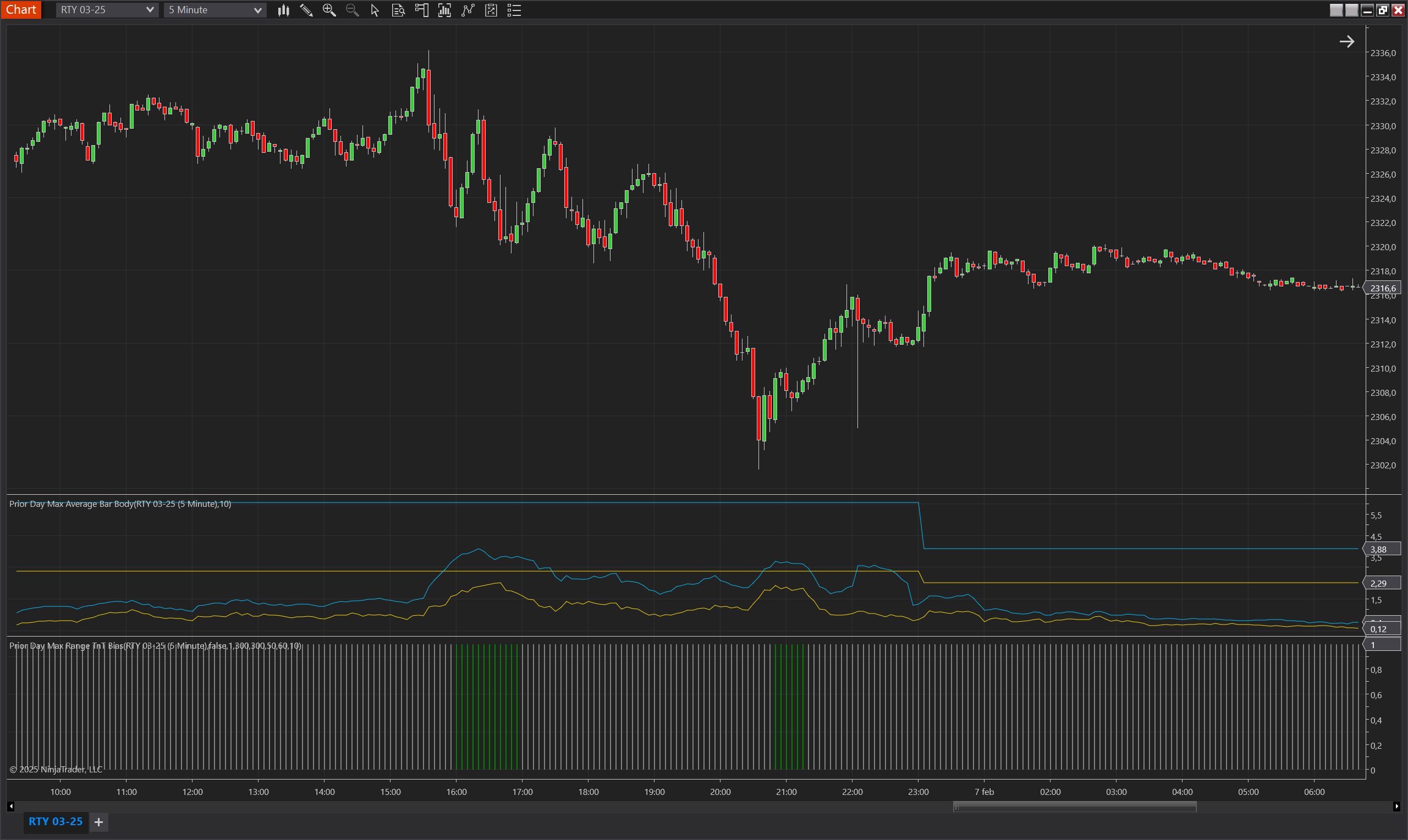
Description
The Prior Day Max Range TnT Bias indicator helps traders identify when the market is within an optimal volatility range by comparing the current average body range and current average bar range to the maximum ranges of the prior day. These max ranges are obtained from the Prior Day Max Average Bar Body indicator.
The indicator does not generate trade signals but instead provides a bias that helps traders determine whether market conditions align with their strategy. By defining minimum and maximum percentage thresholds, traders can set clear criteria for when volatility is within an acceptable range. When conditions are met, the indicator signals a trading bias; otherwise, it signals a no-trade bias.
This tool is especially useful for traders who want to avoid low-volatility conditions, which often lead to choppy and unpredictable price action, and instead focus on periods where the market has sufficient movement to support their strategy.
Key Features
- Trade/No-Trade Bias Identification – Helps traders determine whether volatility conditions are suitable for trading.
- Volatility-Based Filtering – Uses prior day max ranges to compare with current conditions.
- Customizable Volatility Thresholds – Traders can define their own min/max percentage values for bias calculation.
- Bias Validity Control – Allows bias signals to persist for multiple bars before reevaluating conditions.
- Invertible Bias Direction – Can be flipped for strategies that prefer low-volatility environments instead of high-volatility ones.
Tips for Implementation
- Use for Trade Filtering – Helps determine when conditions are not optimal, reducing unnecessary trades.
- Combine with Other Indicators – Works well with momentum indicators like RSI or MACD to refine trade timing.
- Avoid Low-Volatility Periods – If the indicator signals a no-trade bias, consider waiting for better conditions.
- Adjust Bias Validity – Extending the bias validity can prevent frequent shifts in trade bias.
- Invert Bias for Alternative Strategies – If your strategy performs better in low volatility, enable Invert Bias Direction.
Parameters
Period
- Type: int
- Description: Defines the number of bars used to calculate the average range and body range.
- Default Value: 20
- Valid Values: Any positive integer greater than or equal to 1.
Min Percentage Body Range
- Type: int
- Description: The minimum percentage of the Max Average Body Range required to indicate a bias.
- Default Value: 60
- Valid Values: Any positive integer greater than 0.
Max Percentage Body Range
- Type: int
- Description: The maximum percentage of the Max Average Body Range allowed to indicate a bias.
- Default Value: 300
- Valid Values: Any positive integer greater than Min Percentage Body Range.
Min Percentage Bar Range
- Type: int
- Description: The minimum percentage of the Max Average Bar Range required to indicate a bias.
- Default Value: 50
- Valid Values: Any positive integer greater than 0.
Max Percentage Bar Range
- Type: int
- Description: The maximum percentage of the Max Average Bar Range allowed to indicate a bias.
- Default Value: 300
- Valid Values: Any positive integer greater than Min Percentage Bar Range.
Max Bias Validity
- Type: int
- Description: The number of bars for which the bias remains valid after being identified.
- Default Value: 1
- Valid Values: Any positive integer greater than 0.
Invert Bias Direction
- Type: bool
- Description: Allows the trader to invert the trade/no-trade signal, enabling use in both trend-following and counter-trend strategies. When set to true, a trade bias is displayed when the no-trade condition is met, and vice versa.
- Default Value: false
- Options: true (Yes), false (No).
Plots
Trading
- Type: Plot
- Style: Bar
- Color: Green
- Description: Indicates an active trade bias, meaning that the current volatility conditions meet the predefined range criteria. When this plot is active, traders may consider entering trades.
NoTrading
- Type: Plot
- Style: Bar
- Color: Gray
- Description: Indicates a no-trade bias, meaning that the current volatility conditions do not meet the predefined range criteria. When this plot is active, traders may consider staying out of the market.