
Consecutive MA Gap Bias
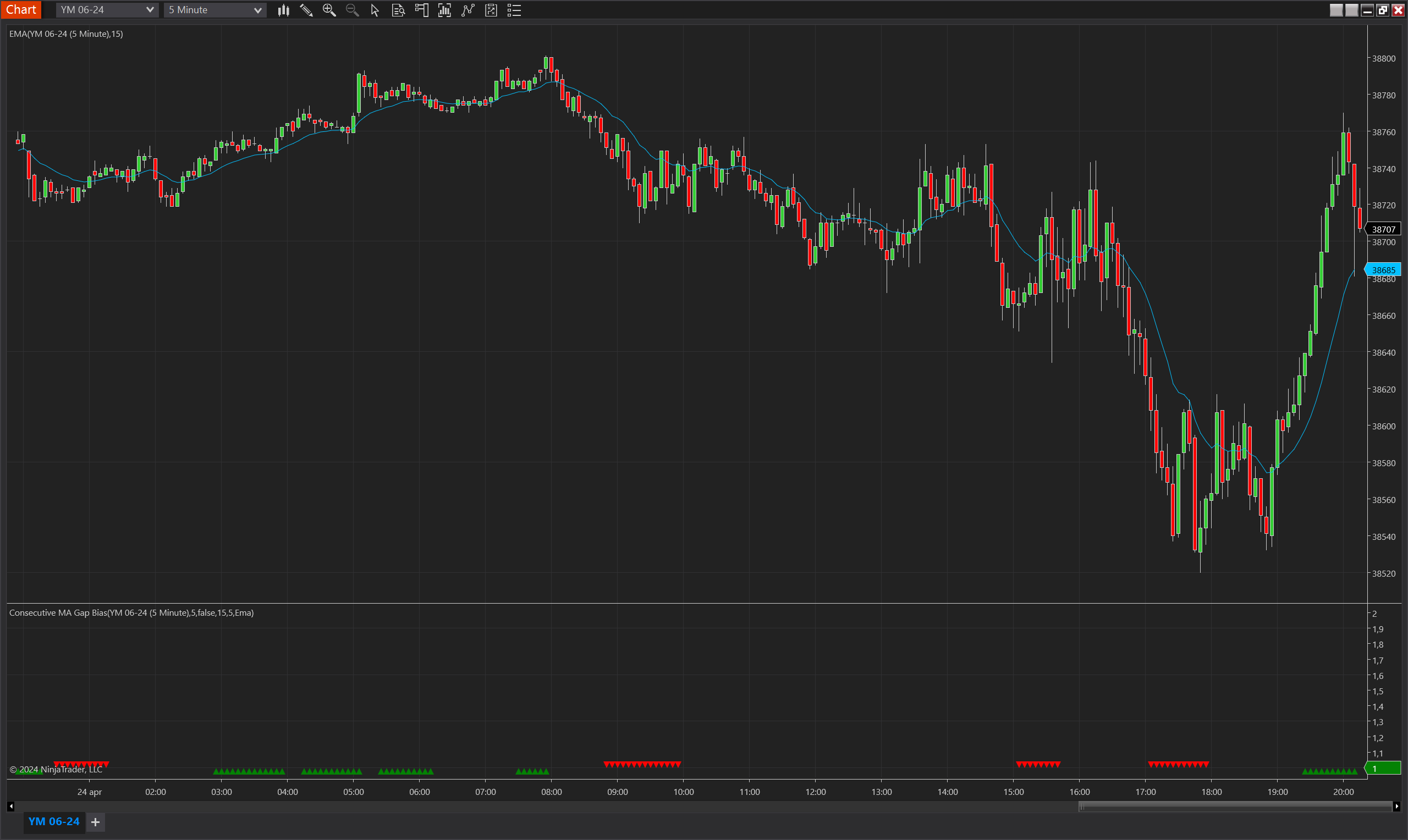
Description
The Consecutive MA Gap Bias Indicator for NinjaTrader 8 provides a visual representation of the bias in price movement in relation to a moving average. The indicator calculates the consecutive bars that have a gap (either above or below) from a specified moving average and indicates the persistence of this bias over a defined number of bars.
This tool is designed to help traders identify sustained bullish or bearish biases in the price action, allowing them to make informed decisions about trade entries and exits based on the strength and duration of the trend.
Key Features
- Indicates bullish or bearish bias based on the gap of the bars with a moving average.
- Customizable moving average type and period to suit different trading strategies.
- Adjustable consecutive threshold to define the persistence of the bias.
- Visual plots (green for bullish, red for bearish) for easy interpretation.
- Suitable across various instruments and timeframes.
- Invertible Bias Direction: The indicator offers a unique feature that allows traders to invert the bias direction. This can be particularly useful when used in conjunction with other indicators to align with specific trading strategies or to counter-check the prevailing market trend signals.
Tips for Implementation
- Integrate this indicator with other technical analysis tools for comprehensive trading strategies.
- Use in combination with volume indicators to confirm the strength of the bias.
- Backtest strategies using historical data to determine the effectiveness of the indicator.
- Experiment with the Max Bias Validity parameter to align the indicator's sensitivity with your trading style
Risks and Considerations
- Past performance is not indicative of future results.
- Always consider market volatility and economic events when trading.
- Employ proper risk management techniques to limit potential losses.
- The indicator is not a standalone trading system but a tool to assist in decision-making.
Parameters
MA Period
- Type: int
- Description: Specifies the number of bars to calculate the moving average over which the gap is measured.
- Default Value: 15
- Valid Values: Any positive integer
Moving Average Type
- Type: TdjMovingAverageProperties.MovingAverageType
- Description: Determines the type of moving average used in the calculation (e.g., Exponential, Simple).
- Default Value: Ema (Exponential Moving Average)
- Options: Ema, Dema, Sma
Consecutive Threshold
- Type: int
- Description: The minimum number of consecutive bars required above or below the moving average to establish a bias.
- Default Value: 5
- Valid Values: Any positive integer
Max Bias Validity
- Type: int
- Description: The maximum number of bars a bias is considered valid after being established.
- Default Value: 5
- Valid Values: Any positive integer
Invert Bias Direction
- Type: bool
- Description: If set to true, the bias indication is inverted; what is normally considered a bullish bias would be indicated as bearish, and vice versa.
- Default Value: false
- Options: true (Yes), false (No)
Plots
BiasUp
- Type: Plot
- Style: Triangle Up
- Color: Green
- Description: This plot represents the occurrence of a bullish bias. It is visualized as green triangles pointing upwards, each marking the confirmation of bullish conditions based on the indicator’s specific criteria. The presence of these triangles on the chart indicates that the bullish bias is active during the defined validity period.
BiasDown
- Type: Plot
- Style: Triangle Down
- Color: Red
- Description: This plot indicates a bearish bias, depicted as red triangles pointing downwards. Each triangle marks the realization of bearish conditions as determined by the indicator's criteria. The appearance of these triangles signifies that the bearish bias is maintained throughout the specified validity period.