
Fair Value Gap Reversal Bias
Description
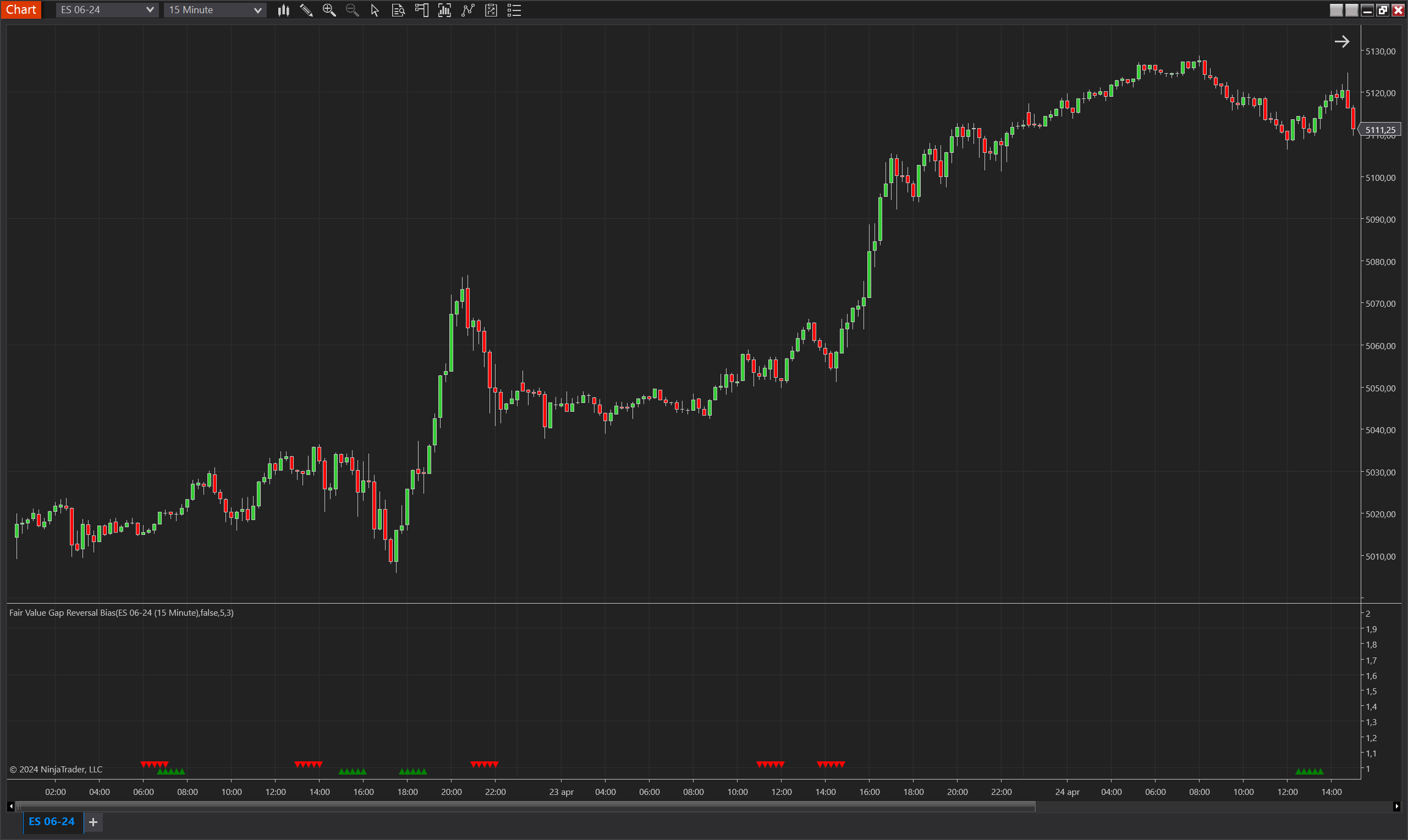
The Fair Value Gap Reversal Bias is a sophisticated indicator developed for NinjaTrader 8, designed to identify significant potential reversal points in the market. This indicator is predicated on observing Fair Value Gaps (FVGs), which are price movements that skip over a range without significant trading occurring within that range. The bias is triggered when an FVG is first noticed in one direction, followed by an opposing FVG within a set number of bars. This pattern indicates a strong market move in one direction, followed nearly as strongly in the opposite direction, suggesting a possible reversal in market sentiment and direction.
This tool is particularly useful for traders looking to capitalize on moments where the market appears to be pivoting, offering a chance to get ahead of new trends as they emerge. The indicator is best utilized in volatile markets where rapid price changes can create multiple trading opportunities.
Key Features
- Fair Value Gap Detection: Identifies significant price movements that represent potential market imbalances, serving as the foundational trigger for bias signals.
- Reversal Confirmation: Requires that an initial FVG in one direction be quickly followed by another FVG in the opposite direction, confirming the potential for a market reversal.
- Bias Validity Window: Provides settings to adjust the duration over which an identified bias is considered valid, allowing for short-term and more sustained trading strategies.
- Visualization of Biases: Uses clear visual markers—green triangles for bullish biases and red triangles for bearish biases—to indicate the current market bias on the chart.
- Invertible Bias Direction: Offers the flexibility to invert the direction of bias signals, accommodating various trading strategies and preferences.
Tips for Implementation
- Complementary Analysis: Combine the Fair Value Gap Reversal Bias with other technical analysis tools like oscillators, trend lines, and volume indicators to confirm the reversal signals and enhance trade accuracy.
- Adjust Settings for Market Conditions: Fine-tune the maximum validity settings for both FVG and bias to match the asset's typical market behavior and your trading style. This helps in capturing the most relevant signals without overextending the bias period.
- Risk Management: Implement strict risk management protocols, including stop-loss orders, to protect against false signals, which can be common in highly volatile market conditions.
- Backtesting: Thoroughly backtest the indicator across different market environments and historical data to gauge its effectiveness and to optimize its parameters for your specific trading requirements.
- Watch for High-Impact Events: Be cautious around major economic announcements or news events, which can increase market volatility and impact the performance of technical indicators like the Fair Value Gap Reversal Bias.
Parameters
Max FVG Validity
- Type: int
- Description: Specifies the maximum number of bars within which an opposite direction Fair Value Gap (FVG) must appear to validate the initial FVG and trigger a reversal bias. This parameter controls how quickly the market sentiment must change to consider the reversal valid.
- Default Value: 2
- Valid Values: Any integer from 2 upwards, where a lower number indicates a requirement for a more immediate reversal in market direction.
Max Bias Validity
- Type: int
- Description: Determines the number of bars for which the identified bias is considered valid after being activated. This setting allows traders to define the temporal scope of the bias's influence on their trading decisions.
- Default Value: 5
- Valid Values: Any positive integer, where a higher value extends the duration of the bias is considered actionable.
Invert Bias Direction
- Type: bool
- Description: Allows users to invert the direction of the bias signals. When enabled, what is typically considered a bullish bias will be indicated as bearish, and vice versa. This feature can be useful for strategies that operate counter to the prevailing market trends or for traders who interpret the signals as potential contrarian indicators.
- Default Value: false
- Options: true (Yes), false (No), enabling traders to adapt the indicator to various strategic approaches.
Plots
BiasUp
- Type: Plot
- Style: Triangle Up
- Color: Green
- Description: This plot represents the occurrence of a bullish bias. It is visualized as green triangles pointing upwards, each marking the confirmation of bullish conditions based on the indicator’s specific criteria. The presence of these triangles on the chart indicates that the bullish bias is active during the defined validity period.
BiasDown
- Type: Plot
- Style: Triangle Down
- Color: Red
- Description: This plot indicates a bearish bias, depicted as red triangles pointing downwards. Each triangle marks the realization of bearish conditions as determined by the indicator's criteria. The appearance of these triangles signifies that the bearish bias is maintained throughout the specified validity period.