
Fair Value Gap Bias
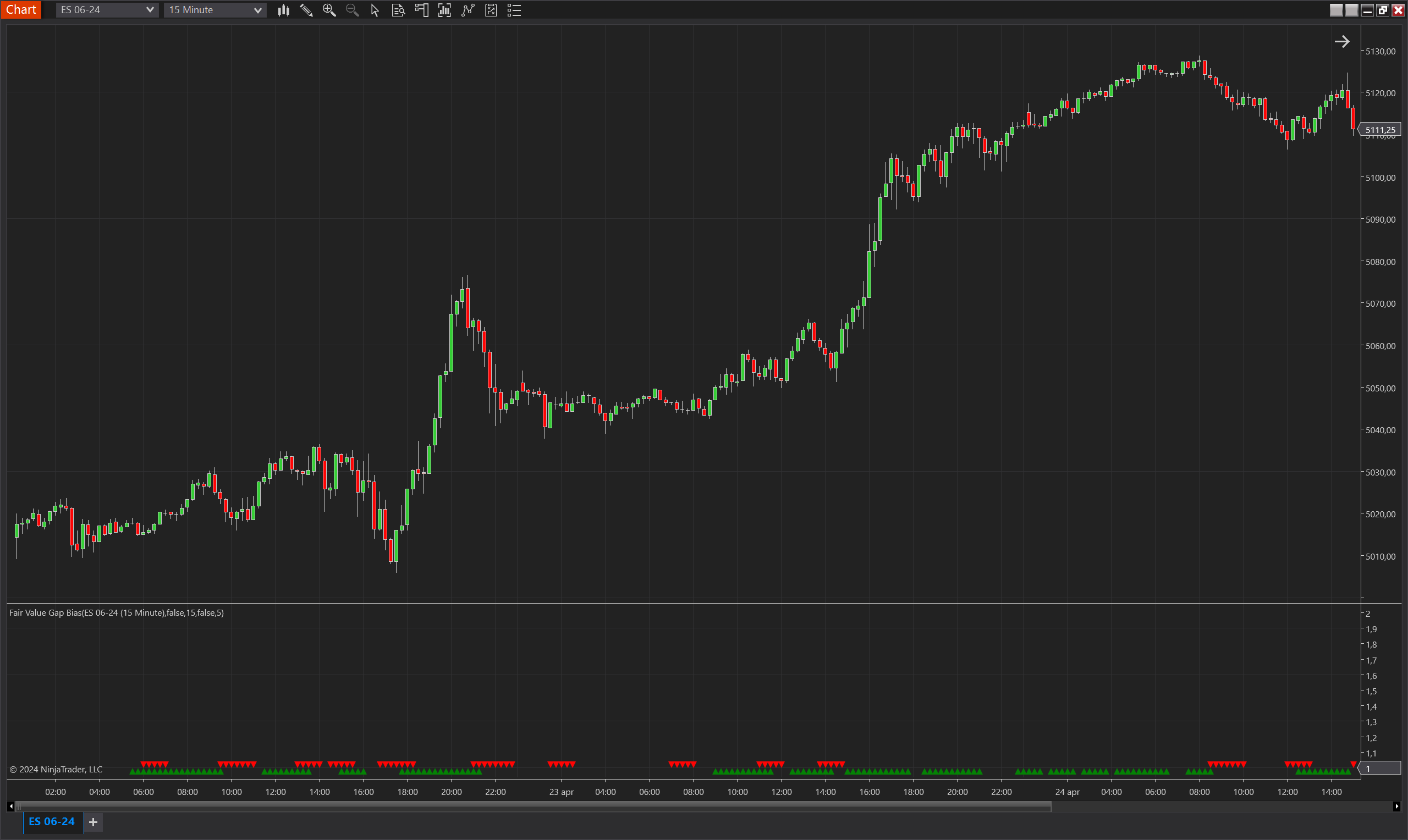
Description
The Fair Value Gap Bias is a sophisticated trading indicator developed for NinjaTrader 8, which leverages the concept of Fair Value Gaps (FVGs) in conjunction with an optional Exponential Moving Average (EMA) filter. This indicator is designed to detect significant imbalances in price action, where the market skips over price levels without meaningful trading, creating potential opportunities for traders to capitalize on these inefficiencies.
When activated with the EMA filter, the indicator becomes even more precise, allowing signals only when the FVG is substantiated by a corresponding gap from the EMA. This dual-validation approach ensures that the biases indicated are not only due to momentary price spikes but are supported by a more substantial divergence from the average market price. The Fair Value Gap Bias is particularly useful in identifying moments when the price is likely to revert or accelerate away from the EMA, offering critical insights into potential trend reversals or continuations.
Key Features
- Fair Value Gap Detection: Identifies significant price jumps that bypass normal trading ranges, which can indicate key levels for potential market entries or exits.
- EMA Filtering Option: Enhances the reliability of bias signals by integrating a gap filter with the EMA, ensuring that identified biases are supported by a significant deviation from the average price.
- Bias Validity Period: Allows traders to specify the number of bars over which a bias remains active, providing flexibility in trading various time frames and market conditions.
- Directional Versatility: Includes a feature to invert the direction of the bias, making the tool adaptable for different trading strategies, including both trend following and contrarian approaches.
- Visual Indicators: Uses upward and downward triangles to clearly denote bullish and bearish biases on the trading chart, aiding in quick decision-making.
Tips for Implementation
- Combine with Volume Analysis: Pair the indicator with volume analysis to confirm the strength and significance of the Fair Value Gaps, as high volume can validate the likelihood of sustained price movements following a gap.
- Adjust EMA and Validity Settings: Customize the EMA period and the maximum validity of the bias according to the asset's volatility and your trading strategy to enhance the indicator's effectiveness.
- Backtesting: Rigorously backtest the indicator under different market conditions and settings to understand its behavior and optimize its parameters for your specific trading needs.
- Use as a Confirmatory Tool: Employ the Fair Value Gap Bias as part of a larger trading system, using it to confirm signals from other indicators or trading setups, which can increase the overall reliability of your strategy.
- Monitor Market Conditions: Be mindful of broader market conditions as FVGs can be more significant during periods of low liquidity or high volatility, potentially leading to false signals.
Parameters
Ema Gap Filter
- Type: bool
- Description: Determines whether the Fair Value Gap must also create a gap with the Exponential Moving Average (EMA) to activate a bias. This adds an additional layer of validation, ensuring that biases are confirmed by significant deviations from the EMA.
- Default Value: false
- Options: true (Yes), false (No)
Ema Period
- Type: int
- Description: Specifies the number of bars used to calculate the EMA. Adjusting this period can change how closely the EMA tracks the price, affecting the sensitivity of the EMA to price movements.
- Default Value: 15
- Valid Values: Any positive integer greater than or equal to 1
Max Bias Validity
- Type: int
- Description: The maximum number of bars for which a bias is considered valid after being triggered. This setting allows traders to manage how long a bias should influence their trading decisions, suitable for different trading styles and strategies.
- Default Value: 5
- Valid Values: Any positive integer greater than or equal to 1
Invert Bias Direction
- Type: bool
- Description: Allows for the inversion of the bias direction signals. When enabled, a bullish bias is interpreted as bearish and vice versa. This feature is useful for traders employing counter-trend strategies or seeking alternative perspectives on market momentum.
- Default Value: false
- Options: true (Yes), false (No)
Plots
BiasUp
- Type: Plot
- Style: Triangle Up
- Color: Green
- Description: This plot represents the occurrence of a bullish bias. It is visualized as green triangles pointing upwards, each marking the confirmation of bullish conditions based on the indicator’s specific criteria. The presence of these triangles on the chart indicates that the bullish bias is active during the defined validity period.
BiasDown
- Type: Plot
- Style: Triangle Down
- Color: Red
- Description: This plot indicates a bearish bias, depicted as red triangles pointing downwards. Each triangle marks the realization of bearish conditions as determined by the indicator's criteria. The appearance of these triangles signifies that the bearish bias is maintained throughout the specified validity period.