
Index Confluence Bias
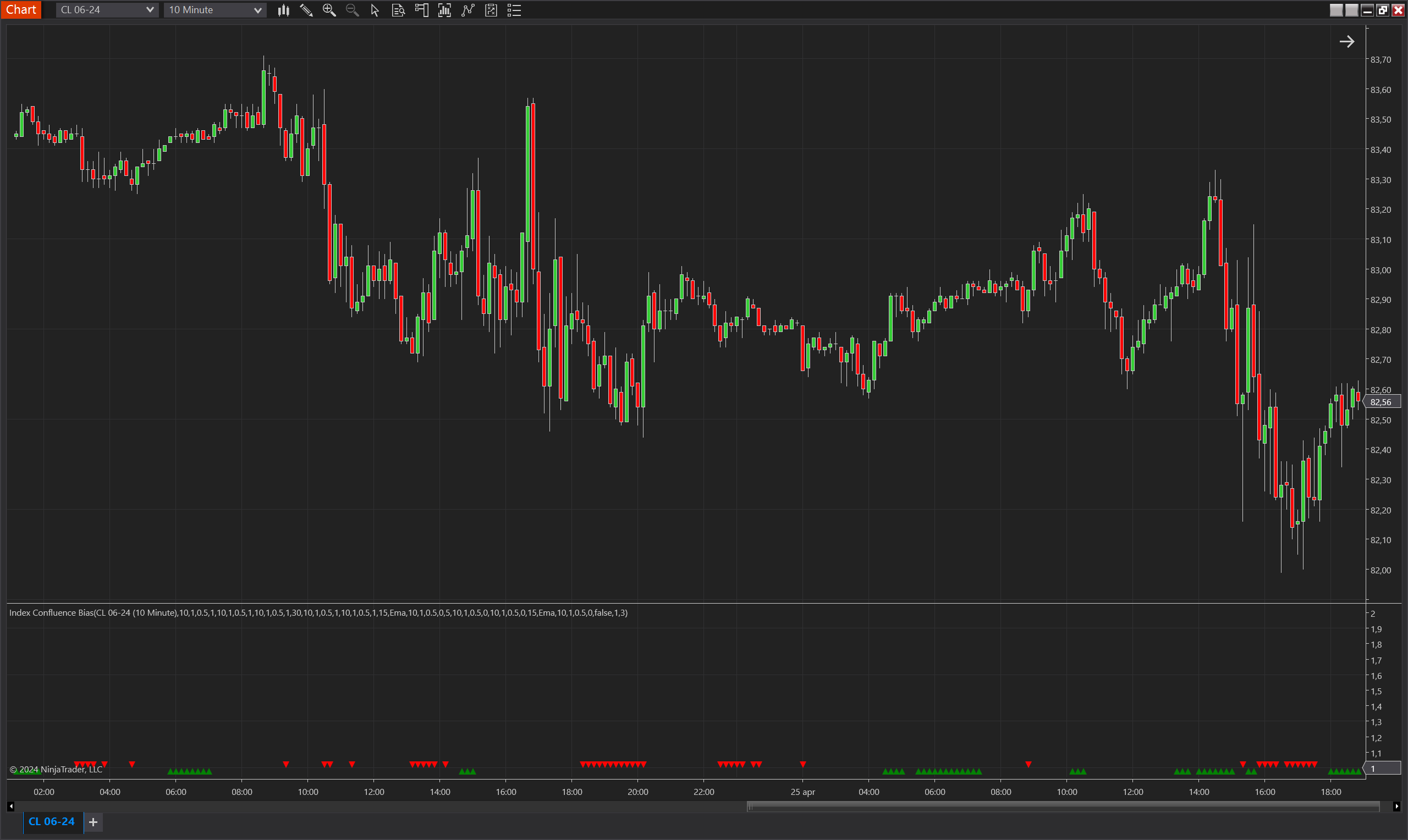
Description
The Index Confluence Bias is a powerful NinjaTrader 8 indicator that aggregates multiple indices to determine a directional bias based on a scoring system. This system allows users to assign different weights to various indicators and generate a bias when the combined score exceeds a user-defined threshold.
Key Features
- Customizable Weight Assignment: Allows users to assign different weights to multiple market indices, tailoring the importance of each based on their trading strategy.
- Flexible Scoring System: Users can set specific conditions and weights that need to be met for a bias to be established. This flexibility ensures that the bias reflects a true confluence of factors.
- Multiple Indicator Integration: Supports integration with a variety of indicators, enabling a comprehensive analysis of market conditions.
- Dynamic Thresholds for Bias Activation: Users can set minimum confluence scores required for a bias to be active, ensuring that the signal is robust and significant.
Tips for Implementation
- Balanced Weight Distribution: For general market analysis, distribute weights evenly across all indicators to get a balanced view of the market conditions.
- Priority Indicator Emphasis: If certain indicators are more significant for your strategy, assign higher weights to these. For instance, if a particular index is critical for your analysis, assigning it a weight of 20 while others have weights of 1 can ensure it dominates the bias decision.
- Threshold Management: Set the threshold slightly above the highest single indicator weight to ensure that the critical indicator must trigger along with at least one other indicator.
- Backtesting for Optimization: Regularly backtest different weight and threshold configurations to optimize the indicator’s effectiveness for current market conditions.
Examples:
Below are four detailed scenarios for integrating various indicator setups into a trading strategy using a confluence bias system. These scenarios will help you articulate the configurations and rationales in your documentation, providing users with clear examples of how to apply these settings effectively.
1. Equal Weight Scenario
Setup:
- All Indicators: Five indicators each assigned an equal weight of 5.
- Minimum Confluence Threshold: Set at 15.
Importance:
This setup ensures that the bias activation requires the alignment of at least three indicators, emphasizing a democratic approach where no single indicator dominates the decision process.
Example Calculation:
- Indicator A: Weight = 5, Signal = Yes
- Indicator B: Weight = 5, Signal = Yes
- Indicator C: Weight = 5, Signal = Yes
- Indicator D: Weight = 5, Signal = No
- Indicator E: Weight = 5, Signal = No
Result:
- Sum of Weights: 5+5+5=155+5+5=15
Since the sum (15) meets the minimum confluence threshold, the bias is activated. This scenario values the collective agreement of multiple indicators to confirm a market trend.
2. Priority Indicator Scenario (Single Critical Indicator)
Setup:
- Critical Indicator: One indicator assigned a weight of 20.
- Other Indicators: Four indicators each assigned a weight of 1.
- Minimum Confluence Threshold: Set at 21.
Importance:
This configuration underscores the critical indicator as a primary decision driver, requiring its signal for any bias activation, complemented by any one of the other indicators to confirm the trend.
Example Calculation:
- Indicator A (Critical): Weight = 20, Signal = Yes
- Indicator B: Weight = 1, Signal = Yes
- Indicators C, D, E: Weight = 1, Signal = No
Result:
- Sum of Weights: 20+1=2120+1=21
The bias activates as the critical indicator's signal, along with one additional indicator, meets the threshold, emphasizing the pivotal role of the primary indicator in trading decisions.
3. Priority Indicator Scenario (Dual Critical Indicators, Threshold 41)
Setup:
- Critical Indicators: Two indicators each assigned a weight of 20.
- Other Indicators: Four indicators each assigned a weight of 1.
- Minimum Confluence Threshold: Set at 41.
Importance:
This setup demands that both critical indicators must signal positively to activate the bias, representing a stringent confirmation process that emphasizes extremely high confidence in trend validation.
Example Calculation:
- Indicator A (Critical): Weight = 20, Signal = Yes
- Indicator B (Critical): Weight = 20, Signal = Yes
- Indicators C, D, E, F: Weight = 1, Signal = No
Result:
- Sum of Weights: 20+20=4020+20=40
In this example, even if all critical indicators are active, the bias does not activate without at least one additional minor indicator's confirmation, ensuring a very robust check before taking a position.
4. Detailed Priority Indicator Scenario (Dual Critical with One Active)
This is the scenario you previously reviewed and approved.
Setup:
- Critical Indicators: Two indicators each assigned a weight of 20.
- Other Indicators: Four indicators each assigned a weight of 1.
- Minimum Confluence Threshold: Set at 21.
Importance:
This configuration ensures the presence of one critical indicator is mandatory, plus at least one other indicator, highlighting the critical indicator's role in decision-making.
Example Calculation:
- Indicator A (Critical): Weight = 20, Signal = Yes
- Indicator B (Critical): Weight = 20, Signal = No
- Indicator C: Weight = 1, Signal = Yes
- Indicator D: Weight = 1, Signal = No
- Indicator E: Weight = 1, Signal = No
- Indicator F: Weight = 1, Signal = No
Result:
- Sum of Weights: 20+1=2120+1=21
The bias is activated, emphasizing the crucial role of the primary indicator while requiring additional minor confirmation to establish a trend, effectively balancing priority with broad-based validation.
These scenarios provide a spectrum from equal weight distribution to heavily weighted critical indicators, offering various strategies to match different risk tolerance and confidence levels.
Parameters
001 Parameters
- Max Bias Validity
- Type: Integer
- Range: 1 to Maximum allowable by platform
- Description: Defines the number of bars for which a bias is considered valid after being triggered.
- Minimum Confluence
- Type: Double
- Range: Any positive value
- Description: Specifies the minimum sum of weighted indicators required to activate a bias. The bias activates when the sum of active indicator weights meets or exceeds this threshold.
- Invert Bias Direction
- Type: Boolean
- Description: If set to true, the direction of the bias is inverted. A normally bullish bias would be interpreted as bearish and vice versa.
002 HL LH Index
- Weight
- Type: Double
- Description: The importance assigned to this particular index when calculating the overall confluence score.
- Value Min
- Type: Double
- Description: The minimum value the HL LH index must reach to be considered active.
- Value Max
- Type: Double
- Description: The maximum value the HL LH index can reach and still be considered active.
- Period
- Type: Integer
- Range: 1 to Maximum allowable by platform
- Description: The number of bars over which the HL LH index is calculated.
003 Up Down Candle Index
- Weight
- Type: Double
- Description: The importance assigned to the Up Down Candle Index when calculating the overall confluence score.
- Value Min
- Type: Double
- Description: The minimum value that the Up Down Candle Index must reach to contribute to the activation of the bias.
- Value Max
- Type: Double
- Description: The maximum value that the Up Down Candle Index can reach while still contributing to the bias.
- Period
- Type: Integer
- Range: 1 to Maximum allowable by platform
- Description: The number of bars over which the Up Down Candle Index is calculated.
004 Up Down Fair Value Gap Index
- Weight
- Type: Double
- Description: Determines the weight of the Up Down Fair Value Gap Index in the overall scoring system for bias activation.
- Value Min
- Type: Double
- Description: The lower threshold value for the index to be considered active.
- Value Max
- Type: Double
- Description: The upper threshold value for the index to remain active.
- Period
- Type: Integer
- Range: 1 to Maximum allowable by platform
- Description: Specifies how many bars are considered when calculating the Up Down Fair Value Gap Index.
005 Close Upper Lower Percent Index
- Weight
- Type: Double
- Description: Weight assigned to the Close Upper Percent Index and Close Lower Percent Index in the overall confluence calculation.
- Value Min
- Type: Double
- Description: Minimum required value of the Close Upper or Lower Percent Index for the index to count towards bias activation.
- Value Max
- Type: Double
- Description: Maximum allowable value of the Close Upper or Lower Percent Index to remain active.
- Period
- Type: Integer
- Range: 1 to Maximum allowable by platform
- Description: Calculation period for the Close Upper and Lower Percent Index.
- Percentage
- Type: Integer
- Range: 0 to 100
- Description: Percentage used to define the upper or lower threshold for the Close Upper and Lower Percent Indices.
006 New High Low Index
- Weight
- Type: Double
- Description: Significance of the New High Index and New Low Index in the bias scoring system.
- Value Min
- Type: Double
- Description: Minimum activation value for both the New High Index and New Low Index.
- Value Max
- Type: Double
- Description: Upper limit value for the indices to contribute towards a bias.
- Period
- Type: Integer
- Range: 1 to Maximum allowable by platform
- Description: Number of bars used to calculate the New High Index and New Low Index.
007 Close Above Below MA Index
- Weight
- Type: Double
- Description: Weight of the Close Above MA Index and Close Below MA Index in the scoring system.
- Value Min
- Type: Double
- Description: Minimum required index value for activation.
- Value Max
- Type: Double
- Description: Maximum index value for maintaining activation.
- Period
- Type: Integer
- Range: 1 to Maximum allowable by platform
- Description: Calculation period for both Close Above and Below MA Indices.
- Moving Average Type
- Type: Enum (EMA, SMA, etc.)
- Description: Type of moving average used for the index calculation.
- MA Period
- Type: Integer
- Range: 1 to Maximum allowable by platform
- Description: The number of bars used for the moving average calculation.
008 New Donchian High Low Index
- Weight, Value Min, Value Max, Period
- (Similar descriptions as above)
- DC Period
- Type: Integer
- Description: Specifies the period of the Donchian Channel used in this index.
009 Closes Outside Index
- Weight
- Type: Double
- Description: Specifies the weight assigned to the Closes Outside Index within the overall confluence calculation.
- Value Min
- Type: Double
- Description: The minimum value threshold for the Closes Outside Index to count towards the bias activation.
- Value Max
- Type: Double
- Description: The maximum value that the Closes Outside Index must not exceed to remain effective in the scoring system.
- Period
- Type: Integer
- Range: 1 to Maximum allowable by platform
- Description: Defines the number of bars over which the Closes Outside Index is calculated.
010 Bar Above Below MA Index
- Weight
- Type: Double
- Description: Determines how heavily the Bar Above Below MA Index is factored into the overall bias scoring mechanism.
- Value Min
- Type: Double
- Description: Sets the lower limit at which the Bar Above Below MA Index begins to contribute to bias activation.
- Value Max
- Type: Double
- Description: Establishes the upper limit at which the Bar Above Below MA Index continues to contribute towards the activation of the bias.
- Period
- Type: Integer
- Range: 1 to Maximum allowable by platform
- Description: The period over which the Bar Above Below MA Index is evaluated.
- Moving Average Type
- Type: Enum (EMA, SMA, etc.)
- Description: The type of moving average utilized in calculating the Bar Above Below MA Index.
- MA Period
- Type: Integer
- Range: 1 to Maximum allowable by platform
- Description: Specifies the number of bars used to compute the moving average for this index.
Plots
BiasUp
- Type: Plot
- Style: Triangle Up
- Color: Green
- Description: This plot represents the occurrence of a bullish bias. It is visualized as green triangles pointing upwards, each marking the confirmation of bullish conditions based on the indicator’s specific criteria. The presence of these triangles on the chart indicates that the bullish bias is active during the defined validity period.
BiasDown
- Type: Plot
- Style: Triangle Down
- Color: Red
- Description: This plot indicates a bearish bias, depicted as red triangles pointing downwards. Each triangle marks the realization of bearish conditions as determined by the indicator's criteria. The appearance of these triangles signifies that the bearish bias is maintained throughout the specified validity period.