
New FVG Sum Max Bias
Description
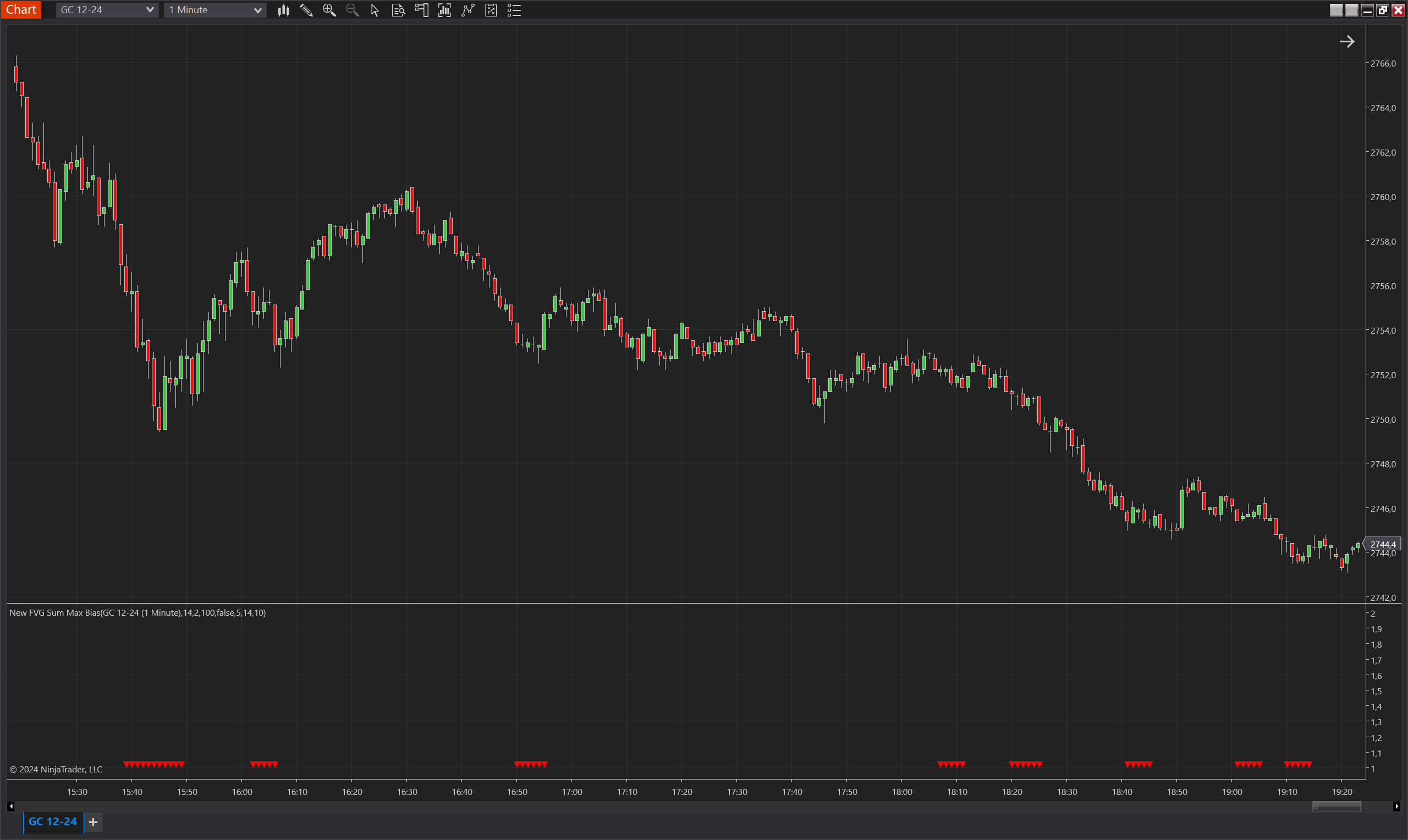
The New FVG Sum Max Bias indicator for NinjaTrader 8 identifies bias signals based on the creation of new maximum Fair Value Gap (FVG) range sums. It employs a combination of fair value gap analysis and ATR-based thresholds to evaluate market momentum and signal potential trend continuations or reversals. This indicator helps traders identify when upward or downward biases are strong enough to warrant attention, particularly when the FVG sum exceeds prior peaks and satisfies specific ATR multiple conditions. The indicator visually represents these biases with triangle markers on the chart.
Key Features
- Fair Value Gap (FVG) Integration: Utilizes the TdjFairValueGapRangeSum indicator to compute FVG range sums and establish maximum thresholds for bias identification.
- ATR-Based Filtering: Incorporates an ATR-based threshold to ensure that signals are only generated when significant movement is present, avoiding minor fluctuations.
- Up/Down Ratio Check: Ensures the generated bias meets a minimum up/down ratio requirement, adding an extra layer of signal verification.
- Customizable Bias Validity: The duration for which a bias signal remains active can be controlled via the MaxBiasValidity parameter.
- Invertible Signals: Includes the option to invert bias direction, providing flexibility for traders using counter-trend strategies.
- Visual Representation: Plots green upward triangles for bullish bias and red downward triangles for bearish bias, enhancing chart readability and quick decision-making.
Tips for Implementation
- Parameter Optimization: Adjust MaxPeriod, FVGRangeSumPeriod, and AtrPeriod to fit the asset being traded and its volatility profile. Higher periods may be beneficial for long-term trends, while shorter periods may suit day trading.
- Signal Filtering: Use SumMinAtrMultiple to filter out noise; increasing this value helps avoid minor, non-significant signals.
- Ratio Validation: Modify FVGMinimumUpDownRatio to adjust the strictness of signal confirmation based on fair value gaps.
- Combining Indicators: Pair with momentum or trend-following indicators for a comprehensive view of market conditions.
- Backtesting: Conduct thorough backtesting to ensure that the chosen parameter settings align with historical market behavior, particularly under different volatility regimes.
Parameters
MaxPeriod:
- Type: int
- Description: Defines the period over which the maximum FVG range sum is calculated.
- Default Value: 14
- Valid Values: Any positive integer
FVGRangeSumPeriod:
- Type: int
- Description: Period used for the calculation of the FVG range sum.
- Default Value: 100
- Valid Values: Any positive integer
SumMinAtrMultiple:
- Type: int
- Description: Minimum multiple of the ATR that the FVG range sum must exceed to trigger a bias.
- Default Value: 10
- Valid Values: Any positive integer
FVGMinimumUpDownRatio:
- Type: double
- Description: Minimum ratio between upward and downward FVG values required for bias confirmation.
- Default Value: 2
- Valid Values: Non-negative double
AtrPeriod:
- Type: int
- Description: Period for calculating the ATR used in bias validation.
- Default Value: 14
- Valid Values: Any positive integer
MaxBiasValidity:
- Type: int
- Description: Number of bars for which the bias signal remains valid after being triggered.
- Default Value: 5
- Valid Values: Any positive integer
InvertBiasDirection:
- Type: bool
- Description: Option to invert the bias direction, toggling the output of bias signals.
- Default Value: false
- Options: true (Yes), false (No)
Plots
BiasUp:
- Type: Plot
- Style: Triangle Up
- Color: Green
- Description: Represents bullish bias, visualized with an upward-pointing green triangle.
BiasDown:
- Type: Plot
- Style: Triangle Down
- Color: Red
- Description: Represents bearish bias, visualized with a downward-pointing red triangle.