
Bar EMA Distance Bias
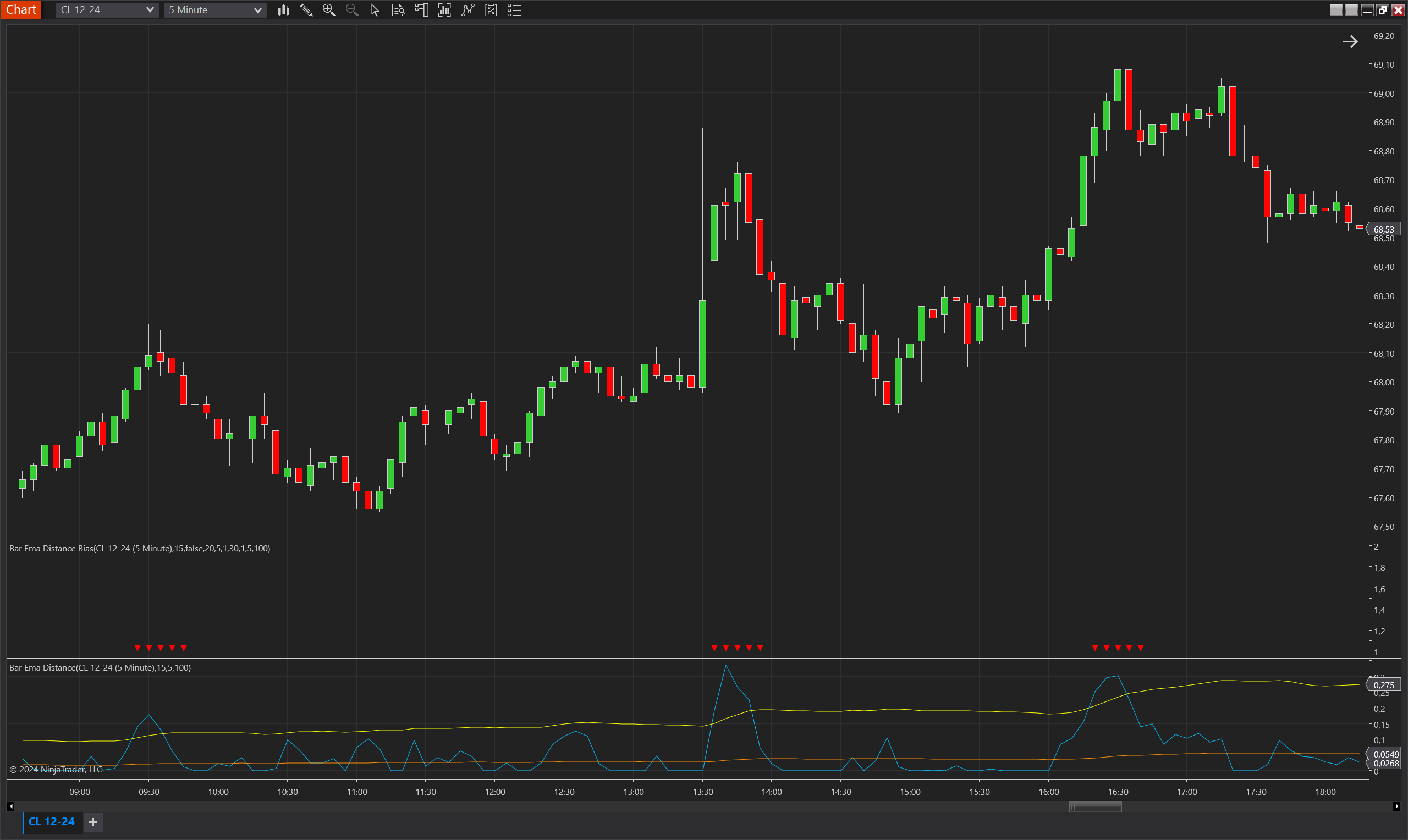
Description
The Bar EMA Distance Bias indicator for NinjaTrader 8 leverages the Bar EMA Distance indicator to create and plot bias signals based on price distance from an Exponential Moving Average (EMA). It evaluates market conditions and generates upward or downward bias signals when specific criteria related to price distance, average multiples, and historical below-average counters are met. This tool is valuable for traders looking to identify potential market reversals or trend continuations with precise, data-driven signals.
Key Features
- EMA Distance-Based Signals: Utilizes the Bar EMA Distance indicator to compute price deviation from an EMA and establish whether a bullish or bearish bias should be plotted.
- Multi-Criteria Bias Detection: Incorporates various conditions such as below-average counter periods, consecutive bar increases, and EMA crossings to validate signals.
- Adjustable Parameters: Provides customizable settings like EmaPeriod, SmaPeriod, Multiplier, and bias validity duration to fit different trading strategies.
- Inversion Capability: Includes an option to invert the bias direction, enabling flexibility for both trend-following and counter-trend approaches.
- Visual Signal Plots: Displays green upward triangles for bullish bias and red downward triangles for bearish bias directly on the chart for easy interpretation.
Tips for Implementation
- Combining with Trend Indicators: Use this indicator alongside other trend confirmation tools to strengthen the reliability of entry or exit signals.
- Parameter Tuning: Adjust EmaPeriod and SmaPeriod based on the market's timeframe and volatility to enhance signal accuracy. The Multiplier can be fine-tuned to control how sensitive the average multiple plot is in identifying extremities.
- Backtesting: Always backtest with various settings, particularly MaxBiasValidity and MinBelowAverageCounter, to ensure robustness under different market conditions.
- Bias Direction Strategy: Toggle the InvertBiasDirection parameter to explore different trading strategies, such as switching between trend-following and counter-trend signals.
Parameters
EmaPeriod:
- Type: int
- Description: Period used for calculating the EMA in both the base and bias calculations.
- Default Value: 15
- Valid Values: Any positive integer
SmaPeriod:
- Type: int
- Description: Period for the SMA in the Bar EMA Distance calculation.
- Default Value: 100
- Valid Values: Any positive integer
Multiplier:
- Type: int
- Description: The factor applied to the average to determine bias threshold conditions.
- Default Value: 5
- Valid Values: Any positive integer
MaxBarAgoBelowSmaCounter:
- Type: int
- Description: Maximum bars ago that the value can be below the SMA for bias validation.
- Default Value: 3
- Valid Values: Any positive integer
MinBelowAverageCounter:
- Type: int
- Description: Minimum count of times the value must be below the average within the MinBelowAveragePeriod before triggering a bias.
- Default Value: 20
- Valid Values: Non-negative integer
MinBelowAveragePeriod:
- Type: int
- Description: The period over which the below-average counter is evaluated.
- Default Value: 30
- Valid Values: Any positive integer
MinConsecutiveIncreaseCounter:
- Type: int
- Description: Minimum number of consecutive bar increases required for bias validation.
- Default Value: 3
- Valid Values: Any positive integer
MaxBiasValidity:
- Type: int
- Description: Number of bars for which a bias signal remains valid after being triggered.
- Default Value: 5
- Valid Values: Any positive integer
InvertBiasDirection:
- Type: bool
- Description: Allows the trader to invert the direction of the bias signals.
- Default Value: false
- Options: true (Yes), false (No)
Plots
BiasUp:
- Type: Plot
- Style: Triangle Up
- Color: Green
- Description: Represents bullish bias, visualized as upward-pointing green triangles.
BiasDown:
- Type: Plot
- Style: Triangle Down
- Color: Red
- Description: Represents bearish bias, visualized as downward-pointing red triangles.