
Momentum Structure Confirmed Trend
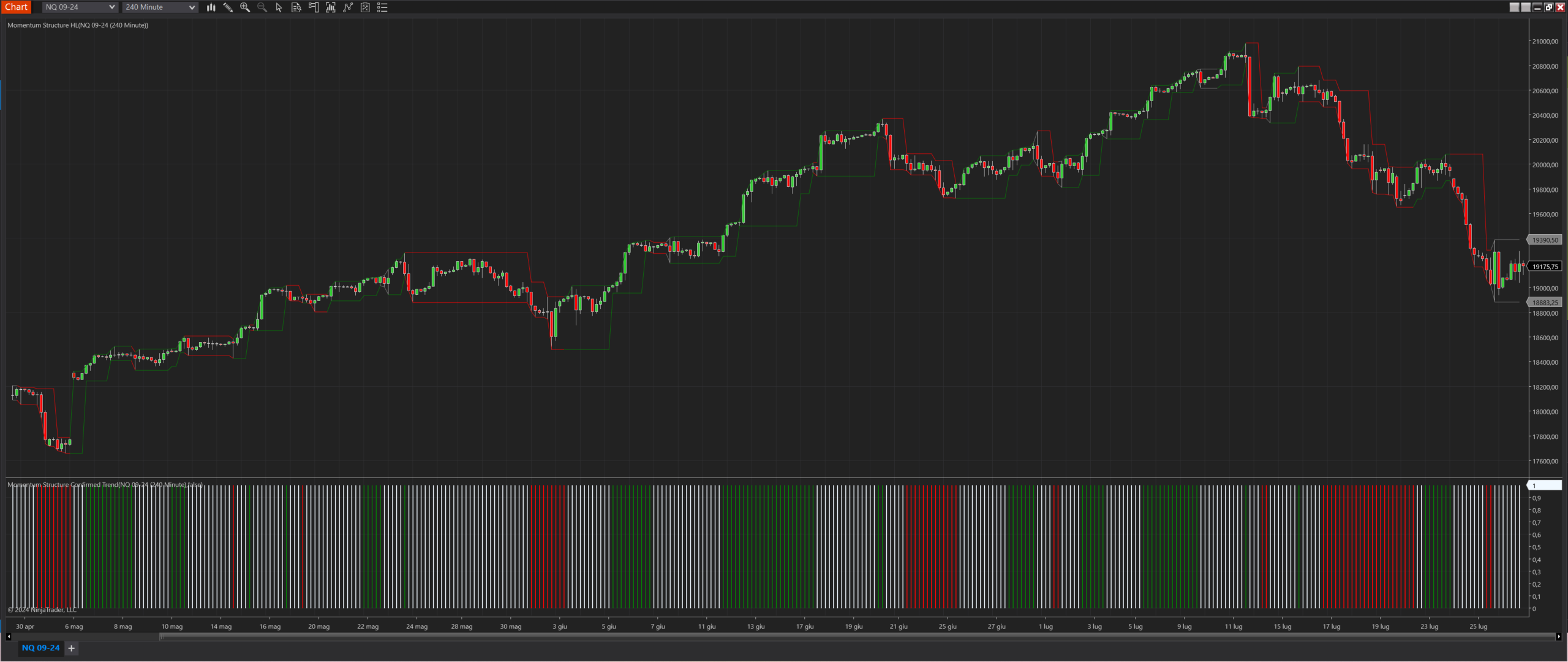
Description
The Momentum Structure Confirmed Trend indicator is a robust tool designed to identify and confirm trends based on the Momentum Structure HL. It is particularly valuable for traders seeking to validate trends with secondary confirmation. The trend is confirmed after a second break in the initial direction and remains valid until a break in the opposite direction occurs. When Light Mode is enabled, the trend switches directly from uptrend to downtrend and vice versa. Without Light Mode, the trend can break into a no trend state before switching direction. This indicator helps traders make informed decisions by providing clear trend signals and avoiding false breakouts.
Key Features
- Trend Confirmation: Confirms trends with a second break in the initial direction, providing reliability in trend identification.
- Opposite Break Detection: Invalidates the current trend upon detecting a break in the opposite direction, ensuring accuracy.
- Light Mode: Simplified version where the trend switches directly between uptrend and downtrend, bypassing the no trend state.
- Visual Plots: Displays trends using distinct color-coded bars for easy visual interpretation.
Tips for Implementation
- Strategic Confirmation: Use this indicator in conjunction with support and resistance levels to validate trend signals.
- Volatility Assessment: Pair with volatility indicators to ensure trend signals occur in favorable market conditions.
- Parameter Customization: Adjust the Light Mode parameter to fit your trading style, simplifying or adding complexity as needed.
- Complementary Indicators: Combine with RSI or Bollinger Bands to confirm trend signals and enhance decision-making.
- Backtesting Necessity: Backtest across various market conditions to fine-tune settings and validate the indicator's effectiveness within your trading system.
Parameters
Light Mode:
- Type: bool
- Description: Toggles the simplified version of the indicator. When enabled, the trend switches directly between uptrend and downtrend without a no trend state.
- Default Value: true
- Valid Values: true (enabled), false (disabled)
Plots
TrendUp:
- Type: Plot
- Style: Bar
- Color: Green
- Description: Indicates an uptrend. A green bar is plotted when the trend is confirmed upwards.
TrendDown:
- Type: Plot
- Style: Bar
- Color: Red
- Description: Indicates a downtrend. A red bar is plotted when the trend is confirmed downwards.
NoTrend:
- Type: Plot
- Style: Bar
- Color: AliceBlue
- Description: Indicates no clear trend. An AliceBlue bar is plotted when no trend is confirmed (only applicable when Light Mode is disabled).