
Camelback Trend
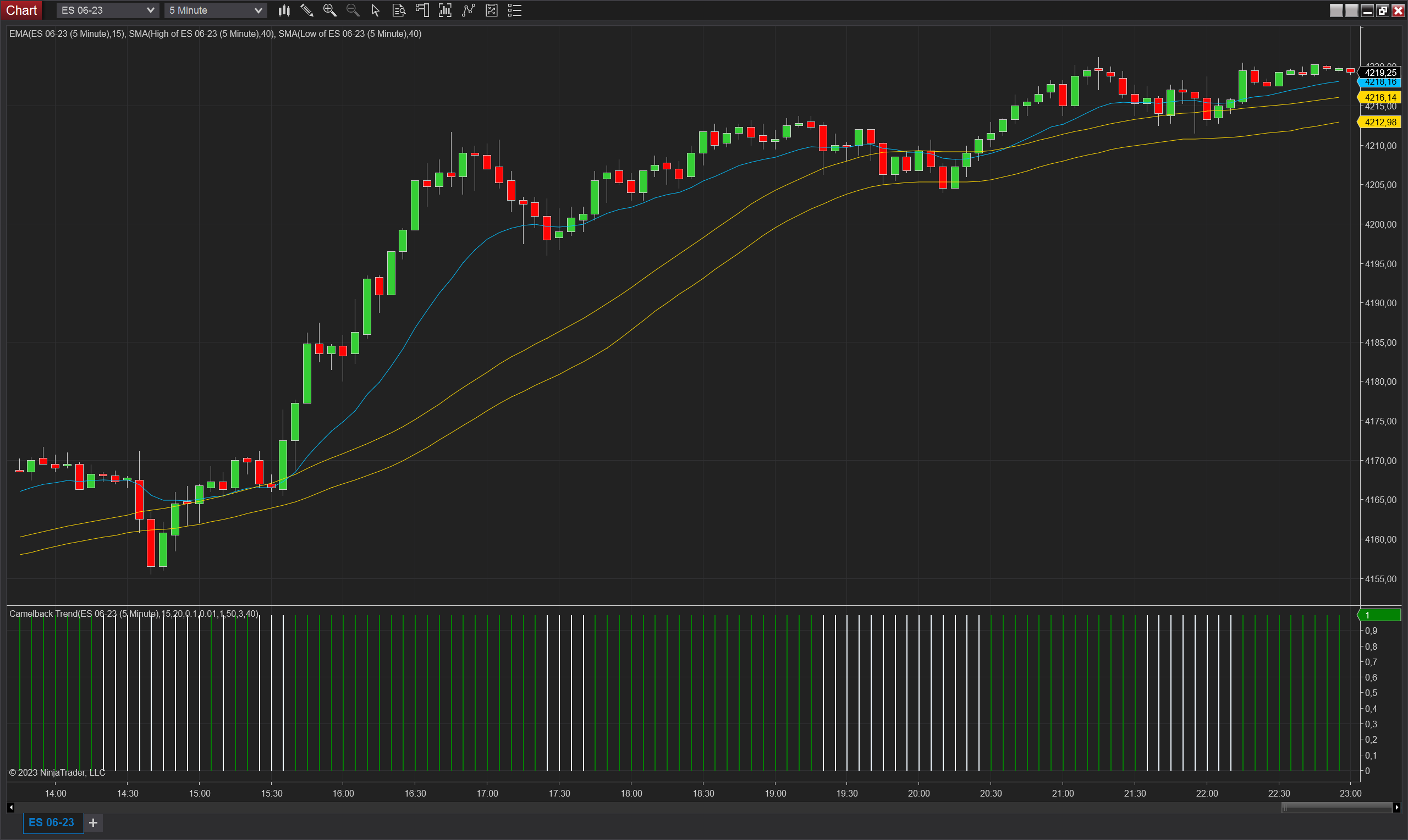
Description
The Camelback Trend indicator is a custom trend indicator developed for NinjaTrader 8. It is based on the Camelback Technique and aims to identify trends in the price action. Unlike typical setup indicators that provide entry and exit signals, the Camelback Trend indicator focuses on highlighting when a trend is present.
The indicator utilizes two moving averages, namely the Simple Moving Average (SMA) 40 and the Exponential Moving Average (EMA) 15, to define a channel. A trend is considered to be in an uptrend when the price bars do not touch the channel created by the SMA 40 on the highs and lows, and the EMA 15 exhibits a positive slope. Conversely, a downtrend is identified when the price bars do not touch the channel and the EMA 15 has a negative slope.
To calculate the slope of the EMA 15, the indicator employs the TradingDJ Slope Indicator. This additional indicator measures the slope based on the specified parameters:
- Slope Segment: Determines the number of bars used to calculate the slope.
- Slope Min Ticks: Specifies the minimum number of ticks required for a slope calculation.
- Min Range Ratio: Sets the minimum ratio of the range (high - low) to consider for slope calculation.
- Min ATR Multiple: Specifies the minimum multiple of the Average True Range (ATR) to consider for slope calculation.
- ATR Period: Determines the period used for calculating the Average True Range.
- Range Period: Sets the period used for calculating the range (high - low).
The Camelback Trend indicator has two main parameters:
- SmaPeriod: Specifies the period for the Simple Moving Average (SMA) 40.
- EmaPeriod: Specifies the period for the Exponential Moving Average (EMA) 15.
Based on the calculations and parameters, the indicator provides three outputs:
- TrendUp: Takes a value of 1 when an uptrend is identified (price bars don't touch the SMA 40 channel, and EMA 15 has a positive slope).
- TrendDown: Takes a value of 1 when a downtrend is identified (price bars don't touch the SMA 40 channel, and EMA 15 has a negative slope).
- NoTrend: Takes a value of 1 when no clear trend is identified.
The Camelback Trend indicator can be used to trade the original Camelback method or as a trend filter for other trading techniques. It helps traders focus on high-probability trend setups by highlighting periods of sustained price movement in a particular direction.
Parameters
Sma Period: Specifies the period for the Simple Moving Average (SMA).
EmaPeriod: Specifies the period for the Exponential Moving Average (EMA).
Segment: This parameter specifies the number of bars to include in the segment of price data that the indicator will analyze.
Min Ticks: This parameter sets the minimum number of ticks between the beginning and end values of the segment. If the difference between the beginning and end values is less than this value, the indicator will not signal a trend.
Min Range Ratio: This parameter sets the minimum ratio between the segment's minimum and maximum values. If the difference between the minimum and maximum values is less than this ratio, the indicator will not signal a trend.
ATR Multiple: This parameter sets the minimum multiple of the Average True Range (ATR) of the selected period that the segment delta must be greater than in order for the indicator to signal a trend.
ATR Period: This parameter sets the period of the ATR used in the ATR Multiple calculation.
Range Period: This parameter sets the number of bars to use in calculating the maximum and minimum values of the range to compare with the MinRangeRatio.
Plots
TrendUp (double): 1 if the trend is up (otherwise 0).
TrendDown (double): 1 if the trend is down (otherwise 0).
NoTrend (double): 1 if there is no trend (otherwise 0).