
Moving Average Bounce System
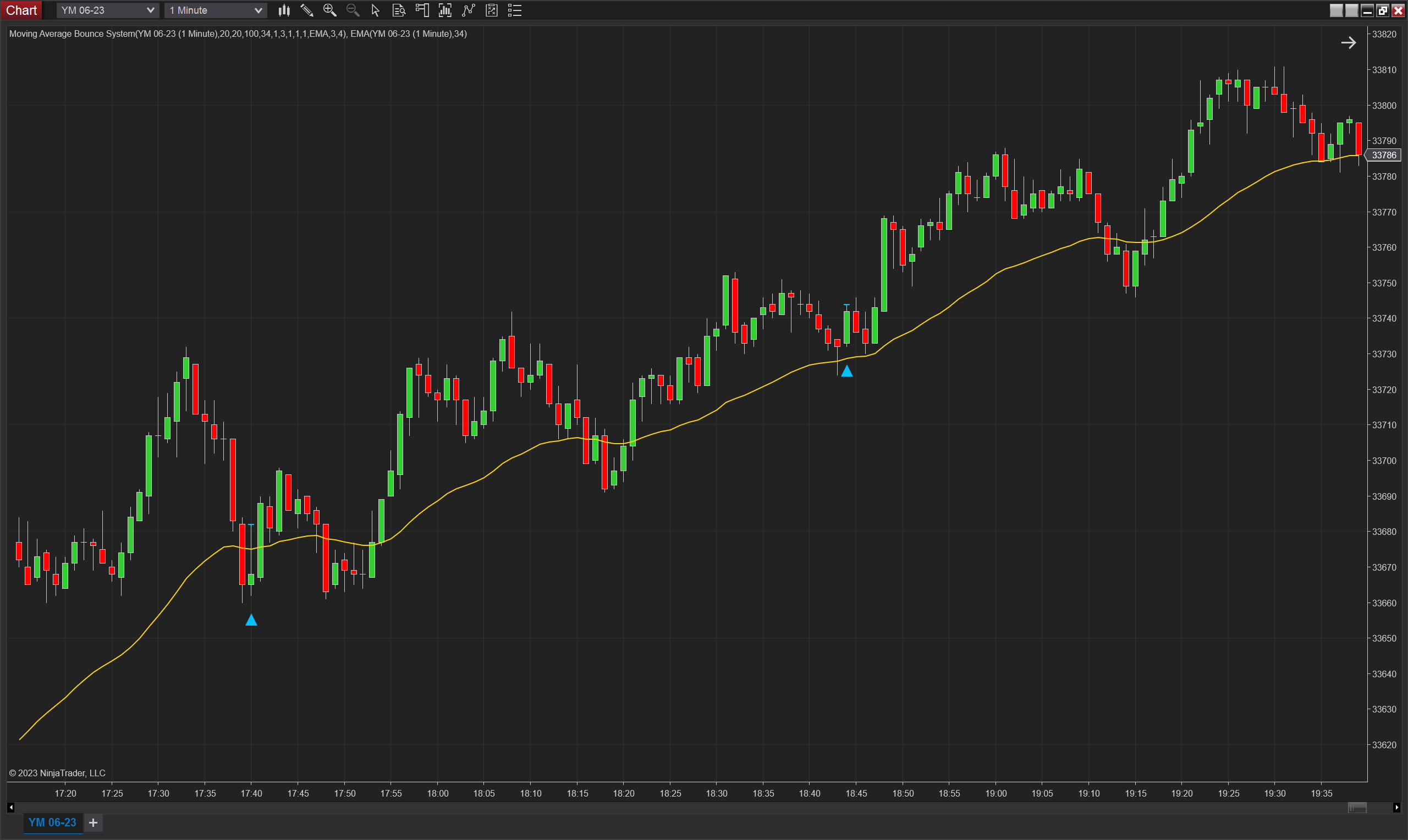
Description
The "Moving Average Bounce System" indicator is a custom indicator developed for NinjaTrader 8, combining the functionalities of two existing indicators: the Moving Average Bounce and the Consecutive Highs And Lows Breakout.
The Moving Average Bounce component of the system is designed to identify potential trade setups based on price action around a moving average. It detects instances where the price touches the moving average, suggesting potential reversals or continuations of trends. Traders have the option to specify the number of bars after the touch that the signal remains active. This setup type allows the indicator to be used in conjunction with other indicators or strategies, serving as a confirming tool.
The Consecutive Highs And Lows Breakout component of the system focuses on identifying specific price patterns. It looks for a series of consecutive higher highs and higher lows or consecutive lower lows and lower highs, based on a user-defined number. Once such a pattern is established, the indicator waits for a user-defined waiting period. After this waiting period, it looks for a breakout of the relevant extreme (highest high for HH-HL or lowest low for LL-LH) that did not form the opposite pattern. If a breakout occurs, a trade signal is generated, and the signal remains valid for a user-defined period of time.
In the "Moving Average Bounce System," the Moving Average Bounce indicator is used as the initial trigger. Once a setup is detected by the Moving Average Bounce indicator, the system starts monitoring the Consecutive Highs And Lows Breakout indicator for a signal. If a signal is generated by the Consecutive Highs And Lows Breakout component, it is plotted on the chart. If no signal is generated, the system waits for the next setup from the Moving Average Bounce indicator before reevaluating.
Overall, the "Moving Average Bounce System" combines the strengths of the Moving Average Bounce and Consecutive Highs And Lows Breakout indicators, providing traders with a comprehensive tool for identifying potential trade setups based on price action and breakout patterns.
Parameters
Base Parameters:
MA Period (int): This parameter allows you to specify the period or length of the moving average. It determines the number of bars used to calculate the moving average.
Moving Average Type (TdjMovingAverageProperties.MovingAverageType): Choose the type of moving average you prefer, such as Simple, Exponential, or Double Exponential. The moving average type affects the calculation methodology.
Bars Not Touching (int): Set the number of bars required for the price to stay away from the moving average. This condition must be met for the indicator to consider a potential bounce.
Plot Offset (Ticks) (int): Adjust the plot offset to align the indicator's plot with the price chart. It allows for visual customization and ensures clear visualization.
Minimum Gap Parameters:
Bars Not Touching (Min Gap) (int): Determine the minimum number of bars required for the price to stay away from the moving average to satisfy the gap condition.
Min Ticks (int): Set the minimum gap size in ticks between the low or high of a bar and the moving average to satisfy the gap condition.
Min ATR Multiple (double): Specify a multiple of the Average True Range (ATR) to define the minimum gap size. It allows for dynamic gap size based on market volatility.
Min Range Percent (int): The "Min Range Percent" parameter determines the minimum percentage deviation between the low of a bar and the moving average to satisfy the gap condition. To calculate this deviation, the indicator utilizes the Donchian Channel. The Donchian Channel measures the price range by subtracting the lower channel value from the upper channel value. The gap between the low of a bar and the moving average must be at least the specified percentage of this price range to fulfil the gap condition. By adjusting the "Min Range Percent" parameter, traders can control the minimum percentage deviation required for a potential bounce.
ATR Period (int): Set the period or length of the Average True Range (ATR) indicator used in calculating the dynamic gap size based on volatility.
DC Period (int): Specify the period or length of the Donchian Channel (DC) indicator used in calculating the dynamic gap size based on the range.
Setup Parameters:
Min Consecutive Bars (int): Specifies the minimum number of consecutive bars required to form the HH-HL or LL-LH pattern.
Period (int): Sets the maximum number of bars allowed for the waiting period. If the waiting period exceeds this number without a valid breakout, the indicator resets and waits for a new set of consecutive bars.
Signal Validity (int): Determines the duration, in bars, for which the generated trade signal remains valid. If the high or low of the signal is not broken during this period, the signal is considered expired.
Plot Offset (Ticks) (int): Adjust the plot offset to align the indicator's plot with the price chart. It allows for visual customization and ensures clear visualization.
Plots
IndicatorSignalUp (double): When a bar meets the conditions set by the indicator parameters, the IndicatorSignalUp plot will have a value that is equal to the low of the bar minus the Plot Offset number of ticks.
SignalUpLevel (double): Represents the level that must be broken for an upward signal to be considered valid. It corresponds to the high of the first signal bar.
IndicatorSignalDown (double): When a bar meets the conditions set by the indicator parameters, the IndicatorSignalDown plot will have a value that is equal to the high of the bar plus the Plot Offset number of ticks.
SignalDownLevel (double): Represents the level that must be broken for a downward signal to be considered valid. It corresponds to the low of the first signal bar.
SignalUp (bool): same as IndicatorSignalUp, but instead of having a double type, we have a bool type. Its value is true when the conditions are met and false when they are not.
SignalDown (bool): same as IndicatorSignalDown, but instead of having a double type, we have a bool type. Its value is true when the conditions are met and false when they are not.